 Omniscape
Pic to Video Render
Aesthetic quote videos for music promotion
An aesthetic quote video is one photo, one line of text and a slow cinematic move, cut vertical for the feed. Omniscape makes them from your photos and your quotes. We built it to run our own artist campaigns, and it is now open to other labels and agencies.
What an aesthetic quote video is
The format is simple. A still photo sets the mood. A short line sits over it: a lyric, a caption, a feeling someone wants to send to a friend. The camera moves slowly through the picture, so it plays as video rather than a slide. It is vertical, 9:16, and it is made to be posted with a sound.
In Omniscape this is a Pic to Video Render. You give it one photo and one quote. The quote is burned on as the caption and stays sharp and still while the image moves under it. Every render gets its own camera move, so two clips from the same photo play differently.
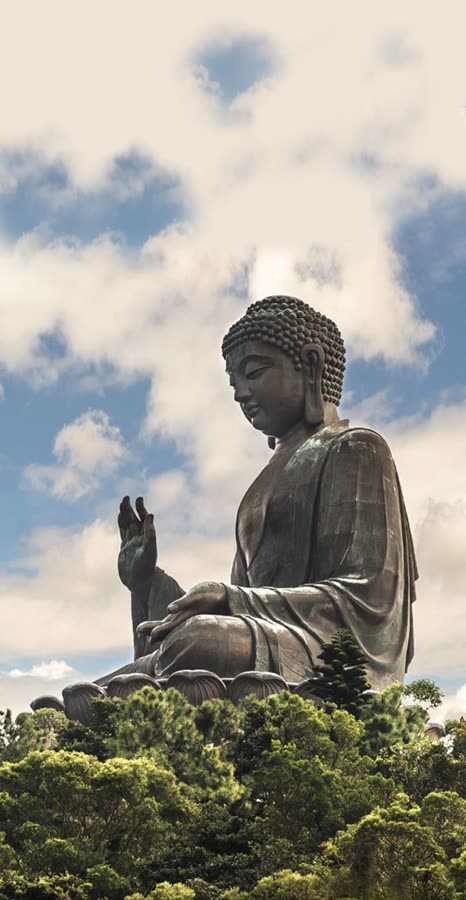
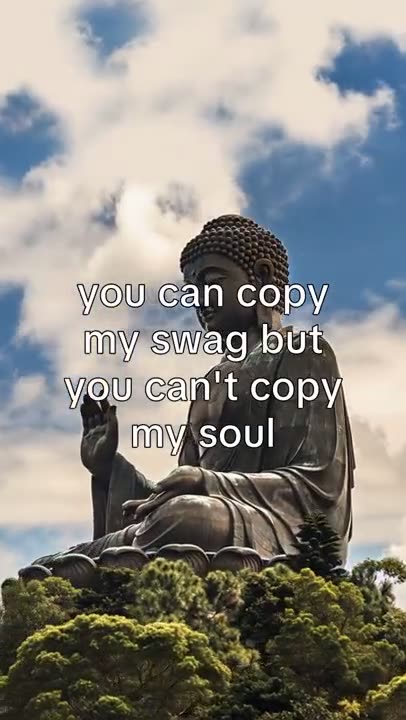
A real Pic to Video Render from our demo library. This photo and this quote produced this clip.
Why quote videos work for music promotion
A song on TikTok or Reels needs a picture to sit under it. A quote video gives the sound a reason to play. The line on screen carries the lyric or the mood, and the sound carries the song. Neither has to do the other’s job.
It also works when the artist is not around. A sky, a street at night or an empty stage can carry the clip, so a release keeps posting without new footage every day.
Each clip is one photo and one line, so it is easy to test. Keep the photo and change the line. Keep the line and change the photo. Post both and watch which one people stay for.
How to make one in Omniscape
Pick a photo.
Start from your Media Library or upload a new one. Photos are tagged by page theme, such as Sad Girl, Hyperpop or Cinematic Film, so you can filter to the look you want.
Pick a quote.
Type your own, or pull one from the Quote Vault. The vault can also suggest new lines from a single vibe keyword.
Hit render.
A Pic to Video Render takes a few minutes and lands in All Content, next to everything else your team has made.
Post with your sound.
Download the clip, upload it to TikTok, Reels or Shorts, and add the track there. The clip is built to carry it.
For a house style, an admin can set one line of guidance for the look of every Pic to Video Render in Settings, such as warm golden-hour light. Each member can add their own on top. The homepage shows the same flow with real renders.
How a team makes fifty
One clip is easy in any app. The hard part is the fiftieth, made by three people for four artists, without the quotes repeating or the look drifting. The rest of Omniscape is built for that.
One Quote Vault
A searchable library for the whole workspace, sorted into categories and tracked by use, so you can see which lines have already gone out.
One Media Library
Photos and clips in banks, tagged by page theme. A new team member can find the right look without asking.
Batch render
Line up a run of videos in one pass, not one at a time.
Logins with render limits
An admin sees everyone on the workspace and can set each member’s render limit, or zero to pause them.
All Content
Every render from every member, from queued to shipped. Download one, copy a share link, or download a set as a zip.
Slideshow Renders and Fan Page memes live in the same workspace, so quote clips sit beside the rest of the release plan. Teams that automate can make Pic to Video Renders through the Renders API, whose reference is public; the quick start walks one render end to end. If you run a roster, read Omniscape for record labels. Plans are in the pricing section of the homepage.
Questions
How long is a clip?
A few seconds. The clip is short on purpose: long enough to read the line, short enough to loop under a sound. It comes out vertical, in 9:16.
What photos work best?
Photos with one clear subject and open space for the line. Skies, streets, rooms, stages and portraits all work. Use photos you have the rights to post, such as the artist’s own shoots.
Can I use my own quotes?
Yes. Type any line, or save your own quotes to the Quote Vault for the whole team. When you are stuck, the vault can suggest lines from a single keyword.
Is it only for TikTok?
No. The clip is a vertical video file, so it posts anywhere that takes vertical video: TikTok, Instagram Reels, YouTube Shorts. You download it, post it yourself, and add the sound on the platform.
Can I brand it?
On a branded workspace your team works in a portal with your logo and colors, on your own subdomain. The clip itself is your photo and your line. Omniscape does not burn its name onto a Pic to Video Render.
Can I make one on the free plan?
The free plan includes Slideshow Renders and Fan Page memes, so you can try the workflow with no card. Pic to Video Renders come with the plans that list them in the pricing section of the homepage.
Make something in the next five minutes.
Pick a photo, pick a quote, and Omniscape renders it. Free to start, no card, no sales call. Running a label or an agency? Talk to us about a branded workspace for your team.